
Welcome to Members: Modern Membership Management
Members is membership management software for member records, subscriptions, entitlements, bookings, and integrations, from the admin dashboard or the API.
What is Members?
Members is modern membership management software for organizations.
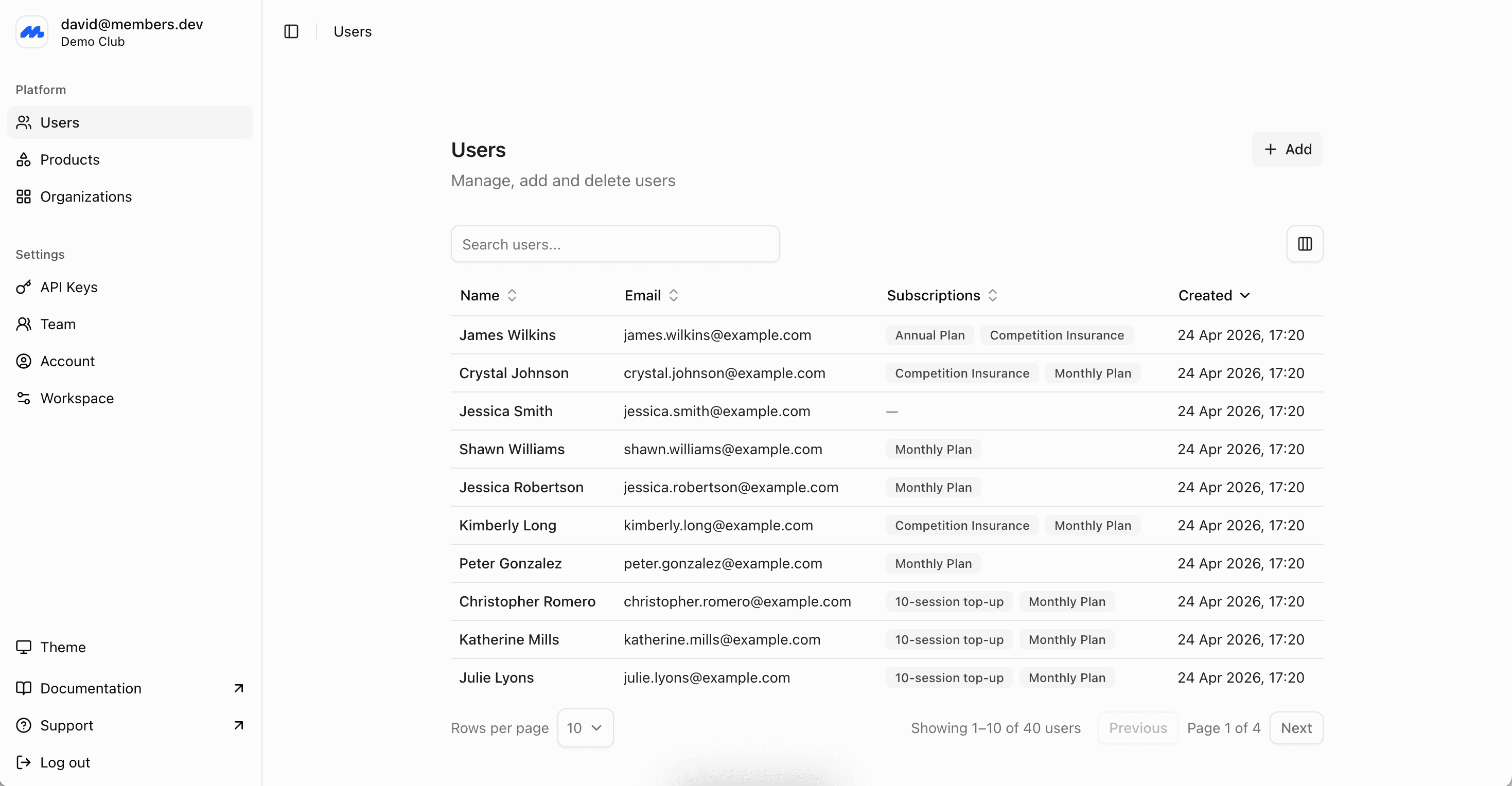
It keeps member records, products, subscriptions, invoices, and entitlements in one place. Staff run the program from the admin dashboard. Your members get a branded website and app, including digital membership cards. If you already have a website, app, door system, or other tools, you can easily connect them to Members.
The goal is simple: one system that knows who your members are, what they pay for, and what they are entitled to, without forcing every membership program into the same template. Flexibility is a core principle behind Members.
Who is Members for?
Members is for organizations that manage ongoing memberships, and want to automate keeping records, billing, and access rules in sync.
That includes:
- Clubs and associations with memberships, multiple tiers, family or corporate plans, renewals, and member benefits.
- Gyms, studios, and wellness businesses with class bookings, recurring memberships, credit packs, pauses, and door access.
- Members' clubs and social clubs with membership applications, subscriptions, events, guest passes, and food and beverage integrations.
- Coworking spaces that need memberships, bookings, and 24/7 access tied to payment status.
- Professional associations with applications, renewals, and member-only benefits.
- Professional sports teams that need to sell season memberships and game-day tickets, and manage mailing lists.
- Universities, colleges, and governing bodies that oversee many clubs or societies from one platform.
- Loyalty, certification, and permitting programs that need to track renewals, expiries, and qualifications, even when the "membership" is not a classic monthly fee.
- Points programs for hospitality, hotels, and travel that need a points-based loyalty program across property management, booking, food and beverage, and point of sale.
Members is a good fit if membership is more than a line in a spreadsheet. You also need recurring payments, member profiles, custom fields, benefit tracking, and a way to connect to other tools.
Clubs and associations
Tiers, family plans, renewals, and member benefits.
Gyms and wellness
Plans, classes, pauses, and access from payment status.
Universities and colleges
Many clubs or societies, with central oversight.
Loyalty programs
Tiers, balances, and consistent benefits across channels.
Why choose Members?
Most membership tools force a trade-off. Spreadsheets are flexible, but they cannot keep up with payments or other tools. All-in-one platforms rarely fit, and they often compromise the member experience. Payment tools collect money, but they do not understand members, pause rules, or entitlements. A custom build is slow to ship and expensive to maintain.
Members is built for the operational core of a membership program:
- One source of truth. Member profiles, subscriptions, invoices, and benefits live together, so staff are not reconciling three systems to answer a simple question.
- Flexible enough for real programs. Tiers, add-ons, group plans, trials, one-off fees, credit packs, and custom fields can be modeled without bending the software into shape.
- Easily extendable. If Members covers most of what you need, the API lets you add a thin layer of your own functionality and leave the operational work to Members. That can cut the time to build a custom membership app from months to days.
- Works with the systems you already have. Bring your payment provider, website, accounting package, or access control. Members does not have to replace your whole stack.
- Help getting set up. Every new organization gets a dedicated account manager and hands-on onboarding, including a design consultation and help migrating from another platform.
Core Features
Members
The membership database is the record of everyone in your program: current members, past members, and anyone you need to keep on file.
Add people in the dashboard, invite them to complete their own details, or import a spreadsheet. Profiles support custom fields and staff-only fields, groups, search and filters, email, and exports. Each member also holds their subscription, invoice, and entitlement history, so staff can see the full picture in one place.
The Members guides cover adding and importing, inviting, custom fields, and archiving.
There is no limit on the number of members.
Accounts
An account is the login someone uses for the member website and app, and optionally the admin dashboard. Member profiles can exist without an account. Invites create accounts and link them to one or more profiles. After claiming, the confirmed email cannot change while the account stays linked.
The Accounts guide covers invites and claiming, members on an account, email restrictions, roles, and disconnecting access.
Products and subscriptions
Products are what you sell. Recurring products cover monthly or annual memberships. One-off products cover joining fees, merchandise, credit packs, and other charges that should not renew.
Subscriptions connect people to those products. You can configure pricing, billing intervals, start dates, trials, and expiry rules. A member can hold more than one subscription, and several people can share a group plan such as a family or corporate membership.
Renewals, invoices, reminders, pauses, and cancellations are handled from the same record. Overdue invoices can pause the benefits tied to that payment. Credit notes and refunds are supported when you need to correct a charge.
The Products and Subscriptions guides cover creating products, subscribing members, group plans, renewals, pauses, and cancellations. For invoices, payments, credit notes, and custom payment methods, see Billing.
Events and bookings
Create one-off and recurring events, then let members reserve a place. Set capacity, take bookings, and manage cancellations. Pricing and availability can depend on membership type, so a member rate or member-only slot stays tied to a live subscription rather than a manual check.
Use it for classes, court bookings, workshops, social events, or any scheduled activity that should know who the member is.
The Events and Bookings guides cover creating events, hosts and resources, pricing and eligibility, managing bookings, and cancellation policies.
Benefit and entitlement tracking
A membership is only useful if you can say what each person is entitled to.
Benefits are the entitlements attached to a product: facility access, class credits, guest passes, voting rights, discounts, or a points balance. When someone subscribes, Members grants those benefits on the rules you set: how many, when they renew, and when they expire. A monthly plan can still issue a guest pass that rolls over and expires after a year.
Staff record usage in the dashboard, or your own systems do it through the API. A door scan, a class check-in, or a redemption at the till can reduce a balance or confirm access. Active subscriptions on the same profile combine, so stacked plans resolve to one set of entitlements.
The Benefits guides cover creating benefits, grants and schedules, usage (including credits), and checking entitlements.
Billing
Every charge follows the same path: an invoice is created, credit notes can reduce what is owed, a payment collects the remainder, and the history stays on the member.
Collect with Stripe, PayPal, or GoCardless, or record offline payments such as cash, cheque, and bank transfer. Issue credit notes when you need to correct a charge or leave credit on account. Overdue invoices can pause the benefits tied to that payment. Invoices can sync to accounting tools including QuickBooks, Xero, Sage, and FreeAgent.
The Billing guides cover invoices, payments, credit notes, and custom payment methods.
Digital membership cards
Issue a digital membership card for each member, with a different design for each tier or product. They add the card to Apple Wallet or Google Wallet and present it at check-in.
Card validity follows membership and payment status, so a lapsed member is not walking around with a card that still looks active.
The Membership Cards guide covers designs, eligibility, issuing cards, wallets, and revoke.
Website and app
Your members get a branded website and apps for iOS and Android, using your logo and colors. They can update their details, manage renewals and payments, book events, and open their membership card without emailing the office.
You choose how much self-service to allow. Renewals, bookings, and profile edits can be member-facing, or kept for staff.
Access control
Connect physical access systems so entry follows membership status. When a member presents a card, app pass, or other credential, Members checks the live subscription and payment state and grants or denies access.
That replaces clipboard checks at the door, and keeps an audit trail of check-ins and denials next to the member record.
API and webhook integrations
The REST API covers the same membership model as the dashboard: members, products, subscriptions, invoices, bookings, benefits, and usage. Most capabilities are available on the API first, so you can build a custom portal, barcode scanner, or internal tool without waiting for a dashboard feature.
Webhooks notify your systems when someone joins, pays, changes plan, or cancels, so access control, email, and other tools stay in sync. Signed payloads let you trust the event came from Members.
Read the API overview or the API reference to see the full surface. If you have a custom build in mind, email support@members.dev and the team can help with planning and implementation.
Quick Start Guide
You can set up a basic program yourself in the admin dashboard. If your products, billing rules, or existing data are more complicated, start with a call. It is the fastest way to avoid rework.
Book a call (recommended)
Talk through your membership types, billing rules, and any systems you need to connect. The team will help you decide what to set up first, and whether a migration or import is involved.
Create an account
Sign up, verify your email, and create your organization. You will set the organization name and country, plus timezone, currency, and language where those apply.
Add a product
Create what members buy. Start with one recurring membership, and add a one-off joining fee if you charge one. You can add tiers and add-ons later.
Add members
Add a few members by hand to learn the profile, or import a spreadsheet if you already have a list. Email and a name are enough to start; custom fields can wait.
Create subscriptions
Subscribe those members to a product and confirm the invoice looks right: amount, timing, and status. From there you can collect payment, issue cards, and grant benefits.
The full walkthrough, including the admin dashboard and day-to-day subscription changes, is in Start Here.
How to migrate to Members?
Most organizations arrive with members already on a spreadsheet, a legacy membership system, or a payments tool. A clean migration is mostly a mapping exercise: who the members are, what they are subscribed to, and what history you need to keep.
- Export what you have. Member profiles, current plans, renewal dates, custom fields, and any balances or entitlements you still rely on. A CSV is enough to start.
- Book a migration call. Share the export and a short description of your products and billing rules. The team will map fields, flag duplicates, and agree what to bring across. That is usually active members and open subscriptions first, then historical invoices and notes if you need them.
- Recreate products in Members. Tiers, joining fees, add-ons, and pause or cancellation rules should exist before subscriptions are created, so entitlements attach correctly.
- Import members and create subscriptions. Small lists can be imported from a spreadsheet in the dashboard. Larger or messier migrations, including custom connectors to your current system, are handled with support@members.dev.
- Cut over payments and integrations. Connect your payment provider, confirm the next renewal dates, then point door access, email, or your website at Members before you turn the old system off.
Renewal dates and payment history can be preserved. Do not cancel the old platform until you have checked a sample of members in Members, including profile, plan, next invoice, and any benefit balances.
Ready to start?
Book a call
Walk through your program and get a setup plan, including migrations.
Create an account
Sign up and follow the start-here guide in the admin dashboard.
Use the API
See what you can build, then generate an API key from the dashboard.
Contact support
Email support@members.dev for setup, imports, or a product question.